
The Student Group Management page allows Platform Managers to create and manage Student Groups. Student Groups can be used to organize students for Group Trackers and to manage student access for staff assigned the Group Access profile.
From Student Supports, click Student Group Management in the upper-right corner.

Click + Add Group in the upper-right corner.
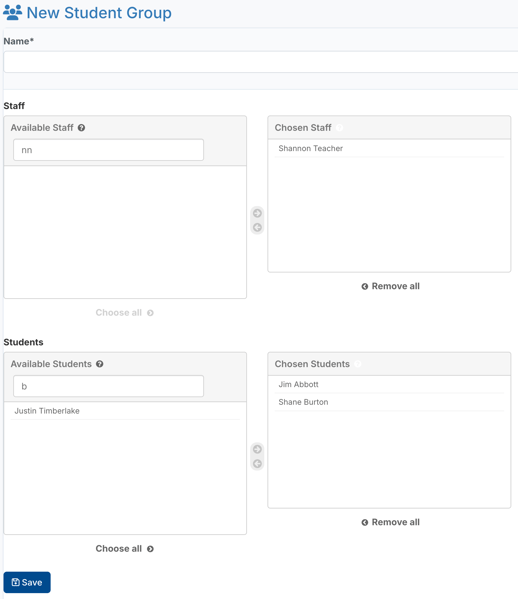
Complete the following information:
Group Name
Enter a name for the Student Group.
Typical Student Group names include:
- Teacher or classroom name
- Program name
- Grade level
- Counseling or intervention group
- Other organizational groupings used by your school or district
Staff Access
Use the Available Staff and Chosen Staff lists to assign staff members to the Student Group.
Assigned staff members will be able to view and manage Behavior Supports for students assigned to that Student Group.
Student Assignment
Use the Available Students and Chosen Students lists to assign students to the Student Group.
Only students included in the Chosen Students list will belong to that Student Group.
Click Save to create the Student Group.
While creating Student Groups is optional, they can improve organization and efficiency throughout Behavior Advantage.
Student Groups are particularly useful when:
- Enrolling multiple students into a Group Tracker. Selecting a Student Group allows all students in the group to be enrolled at once, making enrollment, data entry, and graphing more efficient than selecting students individually.
- Providing Group Access to staff members. Staff assigned the Group Access profile can only view and manage students assigned to their designated Student Group(s).
Note: For staff assigned the Group Access profile, at least one Student Group must be assigned to the staff member and populated with students before they will be able to access student files within Behavior Advantage.
If a Student Group has not yet been created, it can be created from either the Student Group Management page or the Add New Staff page. After selecting the Group Access profile while creating a new staff account, enter a Group Name and click Create & Add Group. The new Student Group can then be assigned to additional staff members and populated with students at any time.