
The Staff List allows Platform Managers to create staff accounts, manage user access, customize feature permissions, and update or deactivate existing staff accounts.
Accessing the Staff List
To open the Staff List:
- Log in to Behavior Advantage or click the Behavior Advantage logo in the upper-left corner.
- From the Navigation Menu, select Staff List under Platform Management.
Creating Staff Accounts
From the Staff List, staff accounts can be created individually or added in bulk.
- Select Add New Staff to create an individual staff account.
- Select Grid Entry to add multiple staff members at once.
Add an Individual Staff Member
Click Add New Staff.
Enter the staff member's:
- First Name
- Last Name
- Role
- Email Address
Note: Staff must use an approved district or organization email address.
Before creating the account, configure the staff member's Student Access and Feature Access.
Student Access
Select the level of student access for the staff member:
- Organization Access – Access to all students within the organization.
- School Access – Access to students within one or more selected schools.
- Group Access – Access to students assigned to one or more selected Student Groups.
- Feature Access Only – No student access. The staff member will only have access to assigned platform features.
School Access
Select one or more schools from the Available Schools list. Selected schools will move to the Chosen Schools list.
Staff members will have access to all existing and future student files assigned to those schools.
Group Access
Select one or more Student Groups from the Available Groups list. Selected groups will move to the Chosen Groups list.
Staff members will have access to all existing and future student files assigned to those Student Groups.
Note: Staff assigned Group Access must be assigned to at least one Student Group before they can access student files. If a Student Group has not yet been created, enter a Group Name and click Create & Add Group. After the group has been created, assign students to the group to provide the staff member with access to those student files.
Feature Access
Choose which Behavior Advantage features will be available within the staff member's account.
By default, all staff accounts include access to:
- BA Academy
- Classroom Support Plan
Turn a feature Off to remove access. Disabled features will no longer appear within the staff member's account.
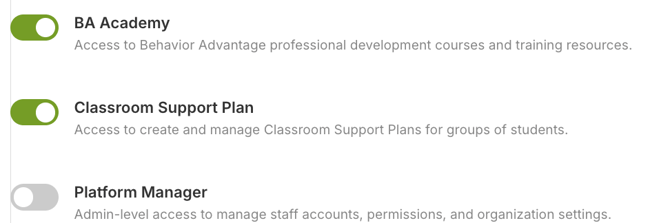
Platform Manager
Enable Platform Manager to provide administrator-level access, including the ability to:
- Manage staff accounts and permissions.
- Configure organization settings.
- Access school- and district-wide dashboards.
- Access additional tools within Platform Management.
Create the Account
After configuring the staff member's profile, student access, and feature permissions, click Create New Staff.
A welcome email containing a secure login link will automatically be sent to the staff member.
Grid Entry
Use Grid Entry to efficiently add multiple staff members at once. Enter information directly into the grid or paste staff information from Excel or Google Sheets.
Enter or paste:
- First Name
- Last Name
- Role
- Student Access
- School
To paste from a spreadsheet, copy the staff information, click the first cell in the grid, and press Ctrl + V (Windows) or Cmd + V (Mac).
Helpful Grid Entry Features
- Use the ↓ button to copy the first value in the Role, Student Access, or School column to all rows.
- Cells with problems will turn red. Correct these entries before continuing.
- Student Access and School can be left blank and configured later.
- Select + Add 10 rows for additional entries.
- Use the × to remove an individual row or Clear all to clear the grid.
When finished, click + Add to Pending List.
Pending Staff
The Pending Staff page allows you to review and complete staff setup before activating accounts.
From this page, you can:
- Review or update staff profile information.
- Assign existing Student Groups or create new groups when appropriate.
- Confirm or modify Feature Access.
Click Save All Staff to save changes made on the page.
Staff will remain in Pending Staff until their accounts are activated. Click Create Account to activate an individual account, or Create All Accounts to activate all staff currently listed.
When an account is created, the staff member will receive a welcome email containing a secure login link.
Managing Existing Staff
Click a staff member's name to update their profile, student access, or feature permissions.
Deactivate Staff
Click Deactivate Staff next to a staff member's name to deactivate their account.
Password Reset
Click Password Reset to send the staff member a password reset email.